- Related Article: Manage Your PointClickCare Profile Email
Learn how to reset your PointClickCare password using the self-service option, so you can quickly regain access to your account on your own.
Table of Contents:
Reset PCC Password:
1: Navigate to the PointClickCare website. (Link)
2: Enter your Username, then click "Next".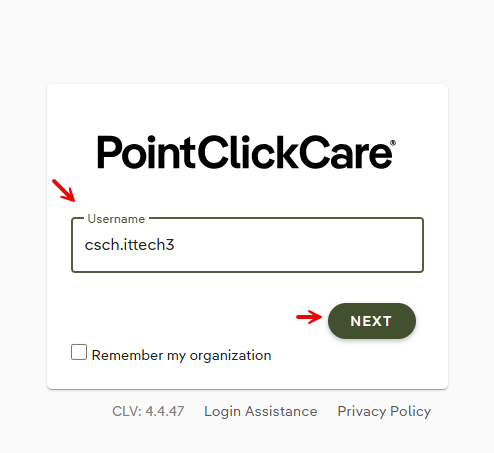
3: Click the "Forgot Password" link.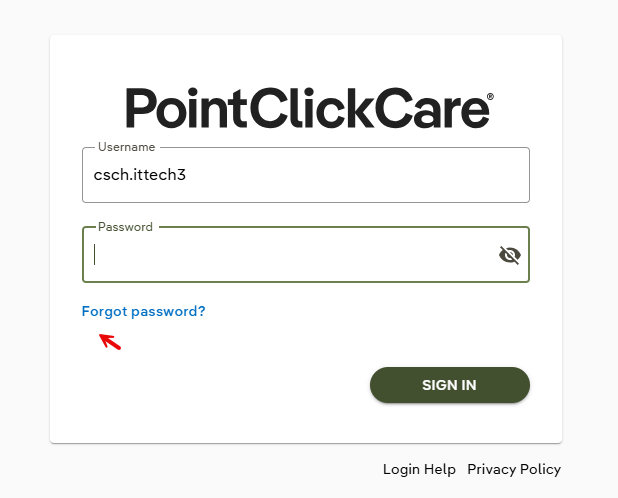
4: On the next page, re-enter your username and click "Request Password Reset".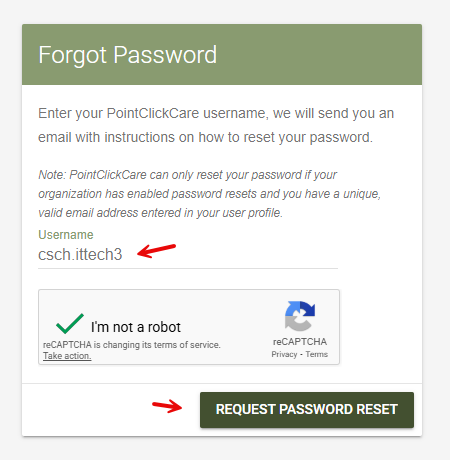
All set!
What Happens Next
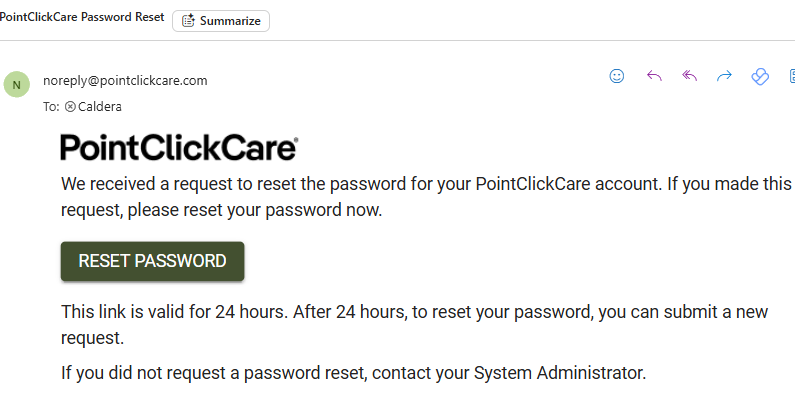
If you have an email address saved in your PointClickCare user profile, you’ll receive an email shortly with instructions to reset your password.
Screenshot:
Troubleshooting & FAQs
If you don’t receive the password reset email, try the following:
- Check your spam or junk folder — the email may have ended up there.
- Confirm that your email address in your user profile is correct.
- Step-by-Step: Manage Your PointClickCare Profile Email.
- Step-by-Step: Manage Your PointClickCare Profile Email.
Video Guide
Was this article helpful?
That’s Great!
Thank you for your feedback
Sorry! We couldn't be helpful
Thank you for your feedback
Feedback sent
We appreciate your effort and will try to fix the article